


If you’re asking, “why did my access card suddenly stop working,” the cause may be the card, the reader, your access permissions, or a wider system issue. Losing entry without warning is frustrating, especially when it isn’t clear where the fault lies.
Before arranging a replacement, check for visible card damage, note whether other authorised users can use the same reader, and ask your building or workplace administrator to confirm that your access is active. Don’t attempt to alter the card or access system. This guide explains how to narrow down the likely cause and choose a sensible next step. If the card may be faulty, RFID access card duplication could be an option, subject to compatibility. Soxxi Master assesses the relevant card and system details and confirms compatibility before service proceeds.
Key Takeaways
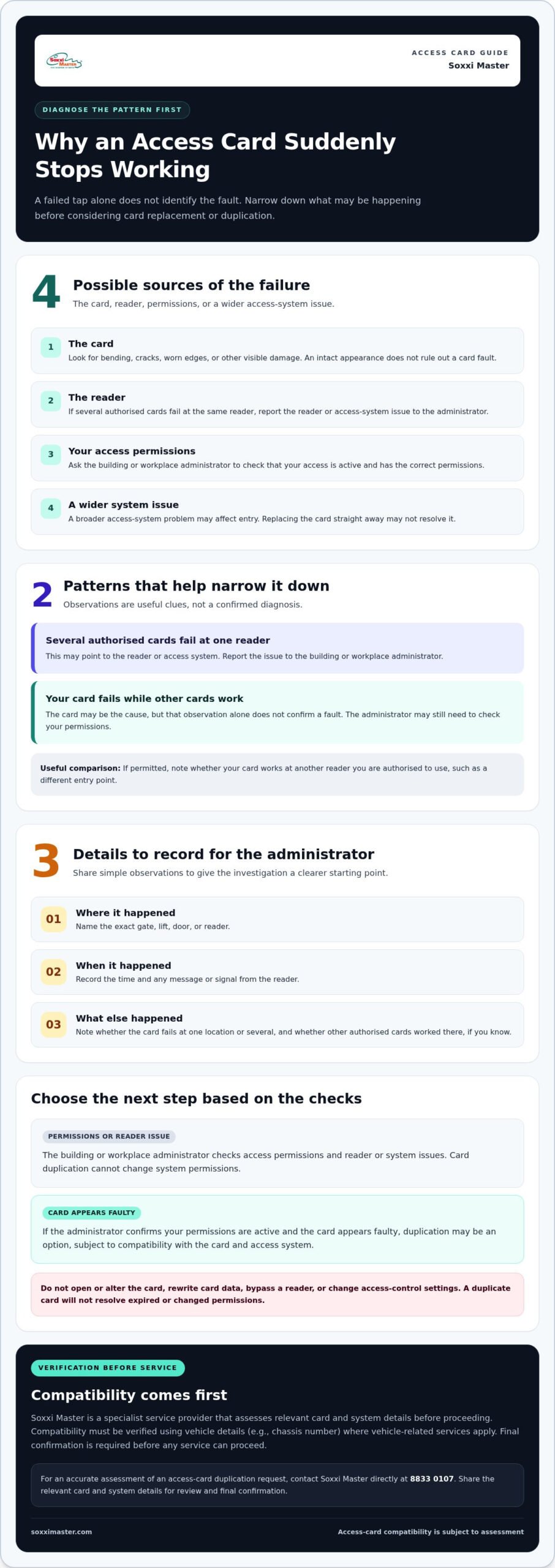
- Why did my access card suddenly stop working? The cause may be the card, reader, permissions, or wider access system. A failed tap alone doesn’t identify the fault.
- Look for bending, cracks, or worn edges, and note whether the card fails at one reader or several. Don’t open or try to repair the card.
- Ask your building or workplace administrator to check whether your access is active. Card duplication cannot change system permissions.
- If the card itself appears faulty, duplication may be a next step. Compatibility must be verified using relevant card and system details, with final confirmation before service.
Why an Access Card Suddenly Stops Working: Card, Reader, or System?
A failed tap doesn’t mean your access card is permanently damaged. If you’re wondering why did my access card suddenly stop working, consider three possible causes: the card, the reader, or access permissions managed by the building or workplace. A wider system issue may also affect entry, so replacing the card straight away may not solve the problem.
Access cards use different technologies to communicate with readers and access-control systems. The overview of access badge technologies explains why a card and reader need to work together. However, a failed scan by itself won’t identify which part is at fault.
How to tell whether the card or reader is the likely issue
Observe what happens without changing settings or trying to modify the system. If it’s appropriate and permitted, note whether another authorised card works at the same reader. If several authorised cards fail there, report the reader or access-system issue to the building or workplace administrator. If other cards work but yours doesn’t, your card may be the cause, but this observation doesn’t confirm a fault.
Also note whether your card works at another reader you’re authorised to use, such as a different entry point. Record where and when the failure happened, along with any message or signal from the reader. This information can help the administrator determine whether the issue appears limited to one reader or follows your card. It isn’t a diagnosis, and the administrator may still need to check your permissions.
If the card appears damaged or faulty, RFID access card duplication may be a practical next step, depending on compatibility with the card and access system. Soxxi Master reviews the relevant details and confirms compatibility before proceeding.
What to Check When an Access Card Fails at a Gate, Lift, or Door
Start with a simple visual check. Look for bending, cracks, worn edges, or other visible damage. Don’t open the card, alter its data, or try to repair it. A card can look intact and still fail, so its appearance alone can’t confirm the cause.
Pay attention to the pattern. Does the card fail at a gate but work at a lift reader? Does it fail at several doors? Note the location and approximate time, as well as any message or indicator you noticed. These observations give the administrator a clearer starting point without requiring you to test or change the access system.
Which details help an administrator investigate an access-card problem?
Share the exact access point, when the issue occurred, and whether other authorised cards worked there, if you know. Explain whether your card fails at one location or several. Ask the property or workplace access administrator to check that the card remains active and has the correct permissions for that gate, lift, or door. The administrator is responsible for checking or changing system permissions.
Stick to observations. Don’t try to rewrite card data, bypass a reader, or change access-control settings. If the administrator’s checks suggest that the card itself may need replacement, RFID card duplication could be an option, subject to compatibility. Soxxi Master assesses relevant card and system details and confirms compatibility before proceeding. Learn more about Soxxi Master’s access-card services.
When to Replace or Duplicate an Access Card, and What Happens Next
If your administrator confirms that your access permissions are active and the card appears faulty, duplication may be a practical next step. A duplicated card won’t resolve expired or changed permissions. The relevant building or workplace administrator controls those permissions and can verify access to specific gates, lifts, or doors.
Soxxi Master provides RFID access card duplication for access systems, subject to compatibility. Before proceeding, the card and system details must be assessed to determine whether the service is suitable. If the issue is with permissions or the reader, the administrator is the right person to address it.
How to request a compatibility-checked card duplication assessment
Share relevant details about the card and access system, and explain where you use it, such as at a gate, lift, or digital lock. Describe what happens when you present the card and whether the administrator has checked that your access is active. These details help Soxxi Master assess the request without assuming the card is at fault.
Compatibility must be verified using relevant card and system details, and final confirmation is required before any service can proceed. Don’t try to change card data or system settings yourself. If duplication is suitable, the assessment can clarify the next step. If permissions need attention, contact your building or workplace administrator.
For an accurate assessment, contact Soxxi Master on WhatsApp at 8833 0107. Share the relevant details for review and final confirmation before service.
Choose Your Next Step with Confidence
If you’re still asking why did my access card suddenly stop working, use the administrator’s checks to guide your next step. This can help you avoid arranging a card service when the issue is actually with permissions or the reader.
If your access is active and the card appears to be the problem, duplication may offer a practical option, subject to compatibility. If the administrator identifies a permissions or reader issue, follow that route instead. A duplicate card cannot change building or workplace access rights.
Soxxi Master provides RFID access-card duplication for condominium gates, lifts, and digital locks. Relevant card and system details are assessed for compatibility, and final confirmation is required before service proceeds. The assessment helps determine whether duplication fits your specific access setup.
A considered assessment helps you choose a next step based on what is actually happening.
Frequently Asked Questions
Can a mobile phone deactivate an RFID access card?
A mobile phone alone doesn’t establish why a card stopped working. If you’re asking why did my access card suddenly stop working, note when the problem began and whether it happens at one or several authorised access points. Share those observations with the access administrator before arranging a replacement.
Does an access card that stopped working always need to be replaced?
No. A reader or wider system issue, or a change to access permissions, may explain a failed tap. Ask the administrator to check the card’s status and whether access arrangements have changed. If the card itself appears faulty, duplication may be an option, depending on card and system compatibility. Compatibility must be verified and final confirmation obtained before service proceeds.
What information should I provide when requesting an access-card duplication assessment?
Share relevant card and access-system details, where you use the card, and what happens when you present it. For example, say whether it fails at a gate, lift, or digital lock. Don’t send passwords, PINs, or administrator credentials. Soxxi Master verifies compatibility and confirms the service before proceeding.
Can an access-card duplication service restore permissions to a building?
No. Duplication assesses whether a compatible card can be duplicated; it doesn’t grant or restore authorisation in a building’s access-control system. If your access was removed or changed, the relevant property or workplace administrator must review it. Card compatibility must be verified, and final confirmation is required before service proceeds.
For an accurate assessment of your access card, contact Soxxi Master on WhatsApp at 8833 0107.