

A new auto gate remote won’t pair just because it looks right: it must match the opener’s frequency and coding requirements. To learn how to program a new auto gate remote, check the opener’s manual first; for an F500 Series sliding gate opener, press and release CODE after holding it for 2 seconds, then follow the pairing sequence for the remote and confirm the indicator response.
It’s understandable to expect one simple sequence, but programming steps vary between gate systems. This guide explains what to check in your manual, how to pair buttons for full or pedestrian access, and how to approach the F500 procedure without confusing it with instructions for another opener. You’ll also learn how to test the remote’s response and what compatibility details matter before pairing.
Key Takeaways
- Read the gate opener’s manual before pairing; the remote must match the system’s frequency and coding requirements.
- Assign buttons deliberately for full or pedestrian access, then test each function separately.
- For an F500 Series sliding gate opener, press and release CODE after holding it for 2 seconds, then follow the pairing sequence.
- If the remote won’t pair, review the system-specific instructions and indicator signals before trying again.
Checking the user manual before programming
Identify the remote by its label or case, then compare its model and coding details with the receiver documentation. In Singapore, match the opener’s receiver model and frequency; examples include 433 MHz and 315 MHz, but neither suits every system.
-
Review the Remote User Manual
Check the gate opener’s manual and locate the section on programming remotes or transmitters before pressing any buttons. Note how to enter programming mode, what the indicator should show, and how the opener confirms that a button has been stored. Procedures differ between models, so don’t rely on instructions for an opener that merely looks similar.
Look for compatibility notes covering frequency and rolling-code technology. For example, a remote and opener must use the same frequency, such as 433 MHz or 315 MHz. Some systems also require rolling-code remotes. Note the exact steps and any warnings about the control board or receiver before beginning.
-
Identify the Remote Model and Compatible Receiver
Read the model information on the remote’s case or label, then identify the receiver or control-board model in the opener’s documentation. Compare these details with the manual’s compatibility information. A similar case shape or button layout does not prove compatibility, so don’t choose a remote by appearance alone.
Check the listed frequency and coding method against the receiver requirements. If the opener has a separate receiver, use its model details rather than relying only on the gate motor’s name. In Singapore, these checks help distinguish systems using, for example, 433 MHz from those using 315 MHz.
- Before programming, keep the manual’s instructions and the receiver details at hand. Confirm which button operates the intended gate function, and follow the indicator signals described in the manual. If the system uses rolling codes, the remote must be compatible with that system. Matching the frequency alone may not be enough.
Pairing remote buttons for full or pedestrian access
- Decide what each button should operate before entering programming mode. Depending on the opener, one button might control full gate access and another pedestrian access. Check the manual for the relevant input and procedure, since button functions vary by system.
- Enter the opener’s programming mode using its documented control-board procedure. For an F630 Series roller gate opener, press the CODE button for 1 second to match a remote button. Follow the indicator light rather than assuming every control board uses the same sequence.
- Press and hold the chosen remote button until the opener’s indicator confirms pairing. If the remote has separate buttons for full and pedestrian access, repeat the programming process for each function. For the described CAME remote-pairing procedure, hold both buttons on the new remote for approximately 7 seconds, until the flashing pattern changes.
- Test each programmed button separately from a safe position. Press the button for full access and check that the gate responds as intended, then test the pedestrian-access button if the opener supports it. A response confirms that the tested button works, but programming one button does not necessarily assign the others.
- If a button doesn’t pair, review the exact model’s instructions and repeat only the relevant sequence. Avoid holding extra buttons or using another opener’s procedure, since programming modes differ. For help with a replacement remote, explore auto gate remote duplication from Soxxi Master.
During pairing, hold the intended button on the remote until the gate opener’s indicator confirms that pairing has registered. Follow the opener’s instructions for interpreting the indicator rather than treating the button press alone as confirmation.
To check the result, press the remote button again and watch for the gate to respond. The indicator confirmation and the gate’s response are useful checks that the button has been paired and operates as intended.
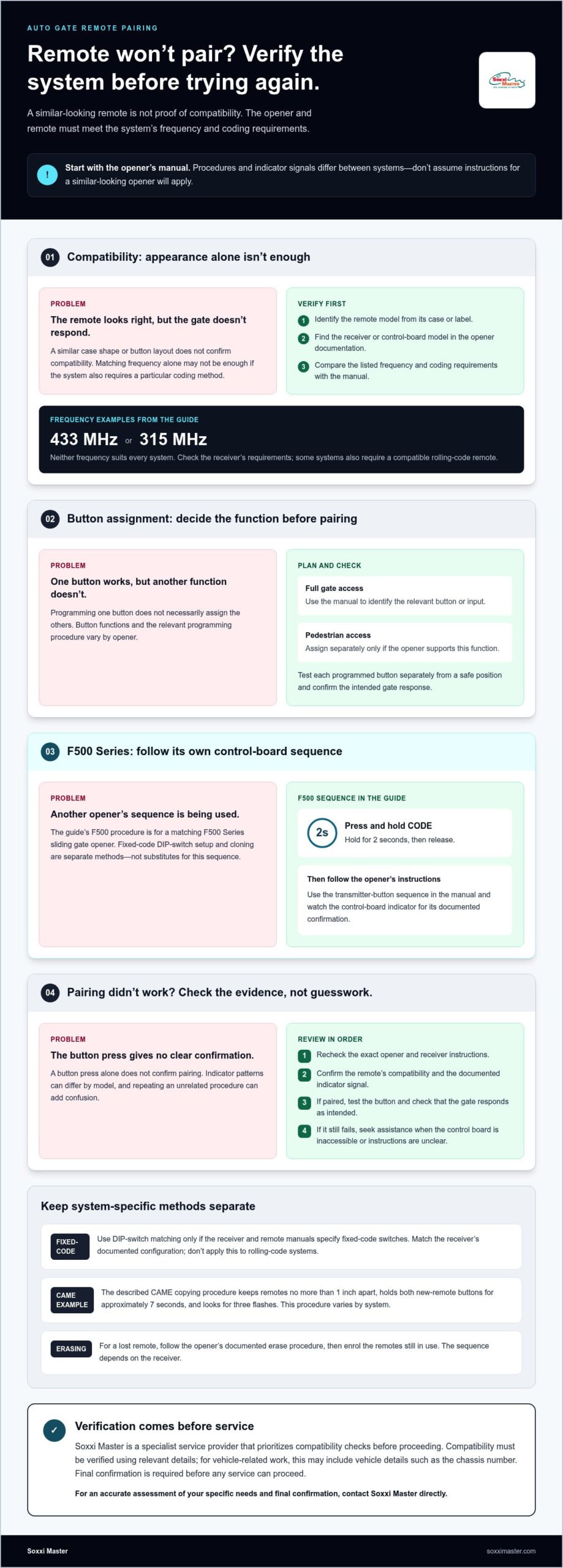
Programming an F500 sliding gate remote
Use the F500 Series procedure only for a matching opener, and follow its control-board indicator. Fixed-code and cloning methods are separate procedures, not substitutes for the F500 sequence.
-
Set DIP Switches on a Fixed-Code Remote
Check the receiver and remote manuals to see whether both use fixed-code DIP switches. If they do, set the new remote’s switches to match the receiver’s configuration, following the manual’s orientation. Don’t guess switch positions or apply this method to rolling-code systems. DIP-switch programming doesn’t replace the F500 Series procedure.
-
Troubleshoot Pairing and Operation
Press CODE on the F500 Series control board for 2 seconds, then release it. Follow the manual’s transmitter-button sequence and watch the indicator; a light may blink or stay solid, depending on the model. If pairing fails, check the steps and remote compatibility, then power the opener off and on before retrying.
- For a fixed-code remote, set the DIP switches to match the receiver’s documented configuration. Other systems use different pairing procedures, so follow the opener’s instructions rather than assuming DIP switches apply.
- Some remotes can be copied from an existing remote, but this varies by system. In the described CAME procedure, keep the remotes no more than 1 inch apart, hold both new-remote buttons for approximately 7 seconds, and look for three flashes.
- If the remote doesn’t work after pairing, check its battery and repeat the procedure for the correct model. You may be able to resolve a simple issue yourself, but seek assistance if the control board is inaccessible or the instructions are unclear.
- For a lost remote, use the opener’s documented erase procedure, then enrol the remotes still in use. Don’t guess at erase controls, since the sequence depends on the receiver.
Soxxi Master: Car & Motorcycle Key Duplication
Soxxi Master provides auto gate remote duplication when you need a replacement or spare. This can be a practical option if the opener’s instructions are unclear or a compatible remote won’t pair. Share the gate system’s details so its compatibility can be assessed.
For car or motorcycle key duplication, compatibility must be verified using vehicle details such as the chassis number. Soxxi Master prioritises verification, and final confirmation is required before any service can proceed.
Contact Soxxi Master to discuss your auto gate remote and receive an accurate assessment of your needs.
Make your next gate access step with confidence
If you’re still unsure how to program a new auto gate remote, don’t repeat a sequence intended for another opener. Identify the gate system first, then follow instructions suited to its requirements. Because compatibility and programming procedures vary, an accurate assessment can help you determine the appropriate next step.
Soxxi Master also offers Car & Motorcycle Key Duplication, RFID Access Card Cloning, and an All Keys Lost Solution. For vehicle-related work, compatibility is verified using details such as the chassis number, and final confirmation is required before service proceeds.
A clear assessment can help you choose the right next step for your access needs.
Frequently Asked Questions
How Do I Synchronize a Custom Gate Remote Control with My Gate Opener?
Follow the receiver’s documented enrolment procedure with a compatible remote, then test the intended button. If pairing fails, move away from nearby Wi-Fi routers or other wireless devices before trying again, as electronic interference may affect synchronization. Watch the receiver’s indicator during enrolment; its response can help show whether a programming step was missed or the remote needs further checks.