


Replacing a depleted cell should restore smooth entrance access immediately, yet finding an unresponsive transmitter at your driveway is intensely frustrating. If you are searching for how to reprogram auto gate remote after battery change disruptions, you might worry that the remote failed mechanically or that you will accidentally wipe the receiver board. Fortunately, typical transmitters rarely erase their stored codes during a simple power swap.
You will learn why your remote stopped responding and how to safely restore gate access without risking your receiver configuration. We preview essential contact checks, rolling code resynchronisation, and when formal bench diagnostics are required, subject to your specific system compatibility.
Key Takeaways
- Understand why transmitter memory remains safe during battery swaps, and how out-of-range button presses can throw rolling code counters out of sequence.
- Follow safe, non-invasive procedures to reprogram auto gate remote after battery change disruptions without risking your main receiver settings.
- Identify physical issues like displaced internal DIP switches, bent contact prongs, and circuit frequency drift that mimic signal loss.
- Recognise when complex multi-tenant restrictions or internal hardware faults require specialist bench diagnostics, subject to system compatibility.
Why an Auto Gate Remote Stops Working After Battery Replacement
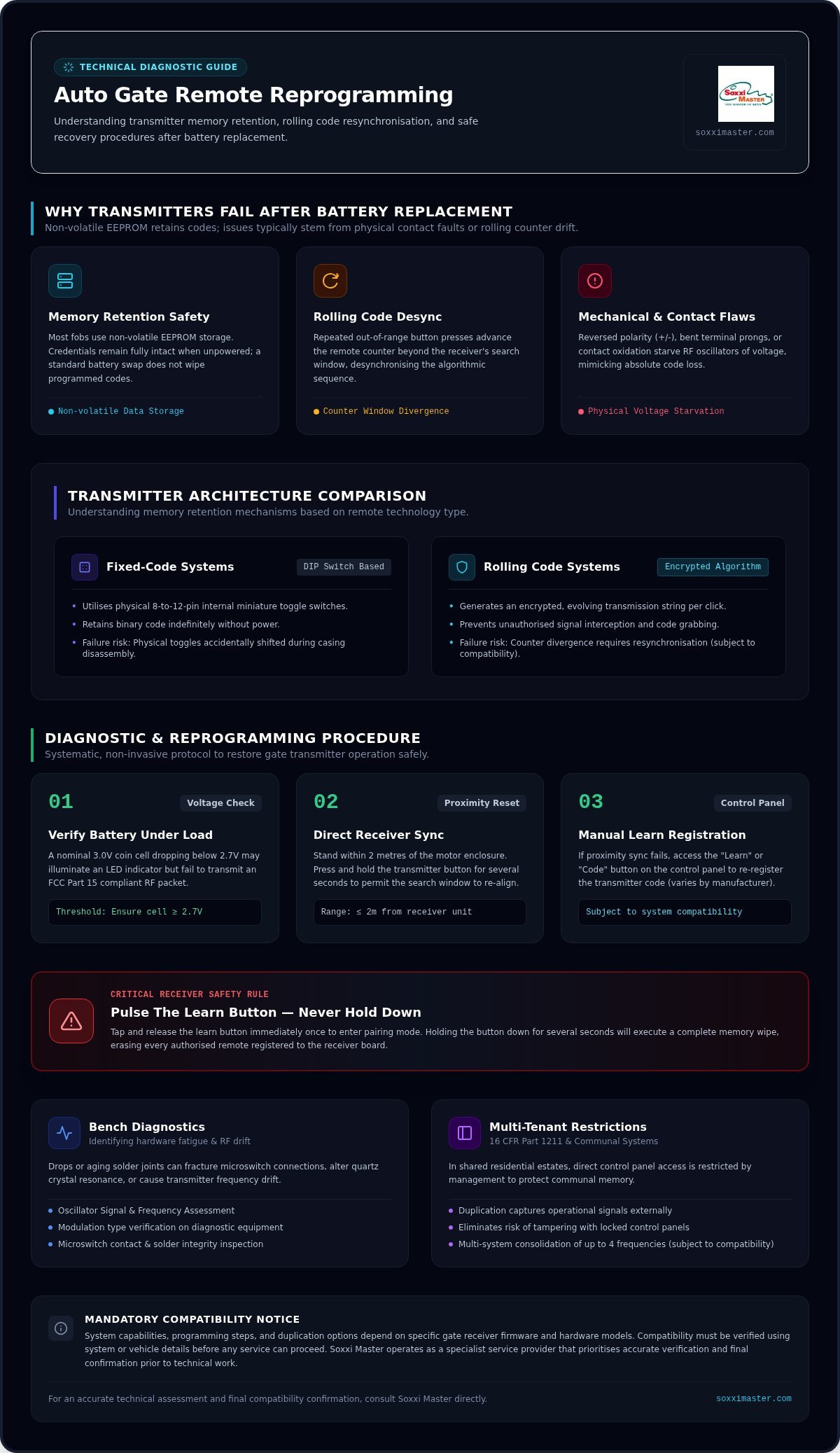
Opening your gate transmitter to install a fresh coin cell rarely erases internal memory. Most access fobs utilise non-volatile EEPROM storage, preserving operational credentials even when completely unpowered. When drivers struggle to reprogram auto gate remote after battery change disruptions, mechanical contact flaws or transmission count shifts are usually the underlying problem.
Desynchronisation occurs when the remote counter value advances beyond the receiver’s algorithmic search window after repeated out-of-range button presses. Modern units deploying rolling code technology require both ends to stay within a synchronized sequence to prevent unauthorized code interception.
Fixed Code Versus Rolling Code Memory Retention
Understanding your hardware architecture explains why responsiveness drops after battery servicing:
- Fixed-code transmitters: Older units rely on physical 8-to-12-pin internal DIP switches. These retain binary codes indefinitely, provided the miniature toggles aren’t accidentally nudged during casing removal.
- Rolling code transmitters: These devices generate an encrypted, evolving transmission string with every click. Pressing buttons while changing cells can cause rolling counts to diverge significantly, requiring formal resynchronisation, subject to compatibility.
- Mechanical contact errors: Inverted cell polarity (+/- reversed), bent terminal prongs, or localized oxidation on brass connectors starve the RF oscillator of proper voltage, mimicking absolute code loss.
Before assuming you must fully reprogram auto gate remote after battery change events, inspecting physical battery contact integrity helps verify whether the transmitter circuit is actually powering up.
How to Reprogram Auto Gate Remote Controls Step-by-Step
Before attempting to reprogram auto gate remote after battery change issues, verify your hardware foundation. A 3.0V coin cell dipping below 2.7V can illuminate an LED while failing to emit a readable radio packet under transmission parameters like FCC Part 15 transmitter standards. Check that internal terminal pins maintain firm spring tension and remain free from surface oxidation.
Next, attempt a simple proximity reset. Stand within two metres of the gate motor enclosure, then press and hold your primary transmitter button for several seconds. Depending on model firmware, this direct burst often allows the internal receiver window to capture and sync the advanced counter value.
Safely Pairing Rolling Code Remotes at the Control Panel
If proximity synchronisation fails, register the transmitter at the receiver board. Follow these careful steps, which vary by manufacturer:
- Locate the receiver switch: Open the motor housing to find the momentary programming switch marked “Learn”, “Radio”, or “Code”.
- Pulse, don’t hold: Tap the learn button once and release it immediately. Never hold this button down for several seconds; doing so will erase every active remote stored on the system.
- Transmit the code: While the board’s diagnostic LED flashes, depress your remote button firmly until the light pattern changes, confirming signal registration.
When manual sync procedures fail to reprogram auto gate remote after battery change attempts, exploring specialised gate remote duplication allows verification without risking control board data, subject to system compatibility.
When Reprogramming Fails: Specialist Diagnostics and Remote Duplication
Persistent transmitter silence after a cell swap often points to deeper circuit fatigue rather than user error. Drops or aging solder joints can fracture microswitch connections, shift quartz crystal resonance, or cause transmitter frequency drift. When you cannot reprogram auto gate remote after battery change steps, bench testing isolates whether the remote hardware failed or the receiver stopped listening.
In shared multi-tenant residential properties, direct control panel access is strictly restricted by building management to prevent accidental memory wipeouts. Here, safety protocols aligned with standards like 16 CFR Part 1211 safety regulations keep panels locked down. You can consult Soxxi Master for professional gate remote duplication, which captures operational signals without tampering with communal control boards.
Verifying Compatibility for Multi-System Access Solutions
Restoring access requires precise technical alignment before programming begins:
- Signal assessment: Specialists verify exact transmission frequencies and modulation types on dedicated diagnostic equipment.
- Hardware consolidation: Advanced multi-system remotes can consolidate up to four separate access frequencies into one unit, subject to compatibility.
- Mandatory verification: System compatibility must be verified using specific remote and receiver details; final confirmation is required before any service proceeds.
If routine pairing attempts fail to reprogram auto gate remote after battery change disruptions, reach out to Soxxi Master directly to receive an accurate diagnostic assessment and verify your setup.
Restore Reliable Access to Your Automated Gate
Replacing a battery doesn’t have to leave you stranded outside. While checking physical terminal contacts and basic receiver pairing resolves most issues, persistent silence requires technical evaluation. Learning how to safely reprogram auto gate remote after battery change events protects your gate receiver board from accidental memory loss.
When physical misalignment or internal circuit drift prevents standard pairing, specialised equipment verifies frequency stability and transmission health accurately. Modern multi-system remotes can also consolidate up to four separate access channels into one durable unit, depending on model. System compatibility must be verified using your remote specifications, and final confirmation is required before any service can proceed.
Regain dependable, seamless control over your property entrance today.
Frequently Asked Questions
Do auto gate remotes lose memory when the battery dies?
Auto gate remotes don’t lose their access credentials simply because the battery drained or was removed. Most units store digital parameters on non-volatile EEPROM chips that retain code memory indefinitely without power. If you need to reprogram auto gate remote after battery change disruptions, the issue is usually rolling code desynchronisation or physical terminal misalignment rather than erased memory.
How do I know if my auto gate remote uses rolling code or fixed code?
You can identify your transmitter type by opening the casing to inspect the internal circuit board. Fixed-code remotes feature a bank of 8 to 12 tiny physical DIP switches used to set binary access pins manually. In contrast, rolling code models lack these switches, relying instead on integrated microcontrollers that dynamically change transmission codes with every press, subject to compatibility.
Why does my gate remote LED illuminate but the gate does not open?
An illuminated LED indicates sufficient residual current to power the indicator bulb, but not necessarily enough energy to drive radio frequency transmission. For instance, a 3.0V coin cell dropping below critical operational thresholds will illuminate an LED while failing to emit a readable signal. Bent contacts, internal frequency drift, or desynchronised counter sequences can also produce this exact symptom.
What happens if I hold down the learn button on the gate control panel?
Holding down the receiver board’s programming switch usually initiates a master system reset, wiping all stored remote memory slots. While a quick pulse registers a new device, holding the button for several seconds deletes every active fob in the system. If this occurs, you must reprogram auto gate remote after battery change cycles alongside every other user’s access transmitter across the property.