

Why Your Copied Access Card Fails on Some Readers
If you’re thinking, “my copied access card doesn’t work on all readers,” the different results can be frustrating, especially when you need to enter a particular area. A card may work at one reader but be rejected by another because readers can use different technologies, system settings or access permissions.
One failed attempt does not automatically mean the card needs another copy. The reader, your permissions or a change to the access system may explain the difference. This guide covers what to check and what information to gather before requesting help.
Soxxi Master provides RFID access card duplication. Suitability depends on the access system, so share which readers accept or reject the card and any relevant system details you are permitted to provide. Compatibility must be checked, and final confirmation is required before any service proceeds.
Key Takeaways
- If my copied access card doesn’t work on all readers, reader requirements or access permissions may be involved. One failed attempt alone does not prove the card is defective.
- Record which door or reader you tried, when you tried it and what happened. If you are authorised to use the original card, note whether it works at the same reader.
- Ask the building or system administrator whether your permissions or any system changes could explain the difference.
- For inconsistent results, contact Soxxi Master for an assessment. Compatibility depends on the access system and must be verified, with final confirmation required before service proceeds.
Why a Copied Access Card May Work on Some Readers but Not Others
Different readers may rely on different credentials, system settings or access permissions. If my copied access card doesn’t work on all readers, treat the result as a clue to investigate, not proof that the card is defective. A reader may use a different setup, or your account may not be authorised for that area.
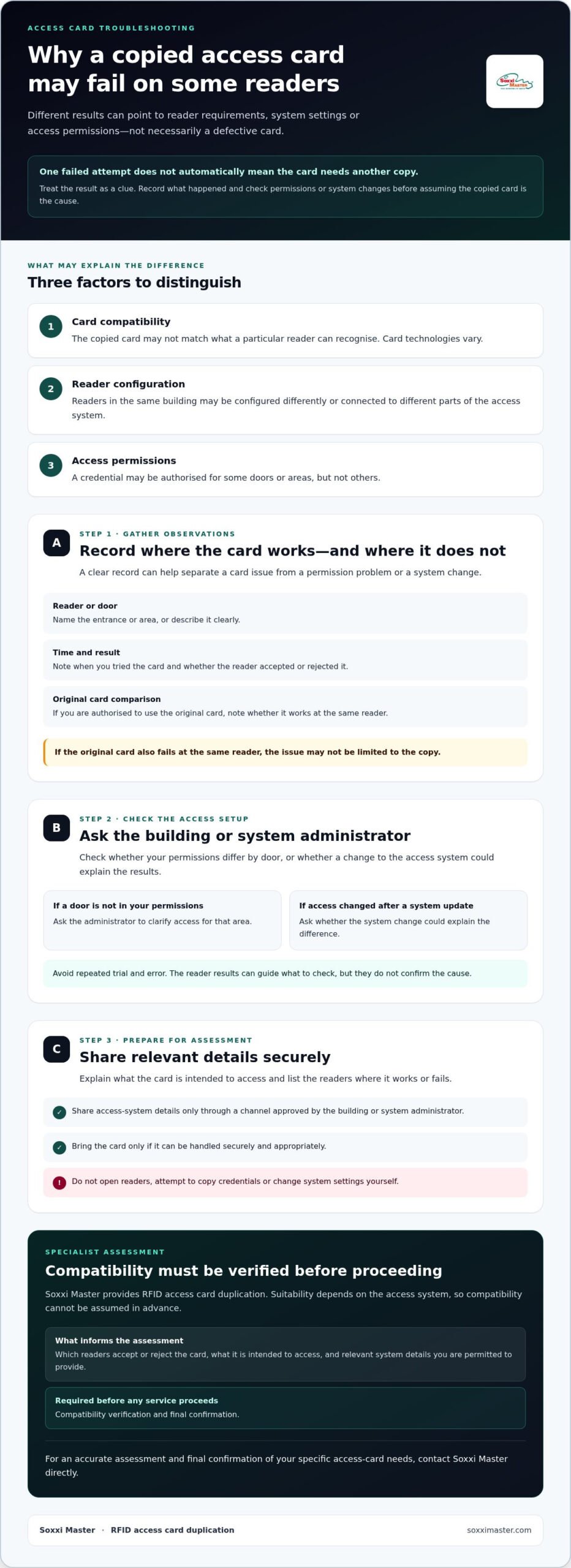
Three factors to distinguish
- Card compatibility: The copied card may not match what a particular reader can recognise. Card technologies vary, as outlined in Proximity card technology.
- Reader configuration: Readers in the same building may be configured differently or connected to different parts of the access system.
- Access permissions: Your credential may be authorised for some doors or areas, but not others.
What does it mean when a copied card works at only some readers?
It means the results differ by reader, but those results alone do not identify the cause. For example, a card that works at a shared entrance but not at a restricted room may be affected by different permissions for that room. If the original card also fails at the same reader, the issue may not be limited to the copy. Ask the building or system administrator to check whether permissions or system changes explain the difference.
Keep the card and reader details available for an assessment rather than assuming another copy will solve the problem. Soxxi Master provides RFID access card duplication, but suitability varies by access system. Relevant system details must be checked, and final confirmation is required before any service proceeds. Read more about the door access card duplication service.
How to Check Where Your Copied Access Card Works
A clear record of what happens at each reader can help distinguish a card issue from a permission problem or system change. If my copied access card doesn’t work on all readers, avoid repeated trial and error. Record the details and check with the building or system administrator before assuming you need another copy.
- Reader or door: Identify the entrance or area by name, or describe it clearly.
- Time and result: Note when you tried the card and whether the reader accepted or rejected it.
- Original card: If you are authorised to use it, check whether the original works at the same reader.
Then ask the administrator whether your permissions differ by door or whether an access-system change could explain the results. If both cards fail at one reader, mention that too. This helps narrow down what to check without treating the copied card as the confirmed cause.
What details should you provide for a compatibility assessment?
Explain what the card is intended to access and list the readers where it works or fails. Share relevant access-system details only through a channel approved by the building or system administrator. Bring the card only if it can be handled securely and appropriately. Do not open readers, attempt to copy credentials or change system settings yourself.
Soxxi Master provides RFID access card duplication, but suitability depends on the access system. A specialist needs relevant system details to assess compatibility, and final confirmation is required before any service can proceed. For more information, visit the door access card duplication page.
When to Request a Specialist Access Card Assessment
Contact the building or system administrator first if you are unsure whether a door is included in your permissions, or if access stopped after a system change. If your permissions appear correct but the copied card behaves differently across readers, an access-card specialist can assess whether the card is suitable for the intended system.
If my copied access card doesn’t work on all readers, do not assume that another copy will fix the issue. The results can guide an assessment, but they do not confirm the cause. If you cannot enter an area you are authorised to access, contact the administrator promptly to ask about approved access options while the issue is checked.
What to expect before any duplication service proceeds
A specialist should first review the card’s intended access system and the reader behaviour you have observed. Share which readers accept or reject the card, along with any relevant system details you are permitted to provide. This helps determine whether the requested service may be suitable, but compatibility depends on the specific system and cannot be assumed in advance.
Soxxi Master provides RFID access card duplication and checks system compatibility before proceeding. Final confirmation is required before any service can go ahead. For an assessment, contact Soxxi Master with the relevant details. You can also learn more about Soxxi Master’s access card services. Request direct confirmation of suitability before arranging service.
Get Clarity Before Requesting Another Copy
If my copied access card doesn’t work on all readers, one reader’s rejection does not prove the card is defective. Reader requirements or access permissions may differ. Record which doors accept or reject the card, then ask the system administrator whether your permissions or a system change could explain the results.
Soxxi Master provides RFID access card duplication and checks relevant system details before proceeding. Suitability depends on the access system, and final confirmation is required before any service can proceed. An assessment can help clarify whether duplication is appropriate for your requirements.
Record what you have observed and contact Soxxi Master to request an access-card compatibility assessment.
Frequently Asked Questions
Why does my copied access card work on one reader but not another?
Your copied card may be accepted by one reader and rejected by another because reader configurations, credential requirements or access permissions can differ. If my copied access card doesn’t work on all readers, that result alone does not confirm the card is defective. Note which doors accept it, then ask the building or system administrator whether your permissions or a system change could explain the difference.
Can an access card be copied to work on every reader?
Do not assume that one copied card will work on every reader. Suitability depends on the credential and access system, and permissions may also vary by door or area. A card that works at one entrance may still be rejected elsewhere. Ask the system administrator or a specialist to check compatibility before arranging another copy.
What should I check if my copied access card stops working?
Record which door or reader rejects the card, when you tried it and what happened. If you are authorised to use the original, note whether it works at the same reader. Then ask the building or system administrator whether your permissions changed or the system was updated. Do not try to alter the reader or access settings yourself.
How can I confirm whether my copied access card is compatible?
Share the card’s intended use, the readers where it works or fails, and relevant access-system details with a specialist through an appropriate channel. Soxxi Master provides RFID access card duplication, but suitability depends on the relevant system details. Compatibility must be checked, and final confirmation is required before any service proceeds.