

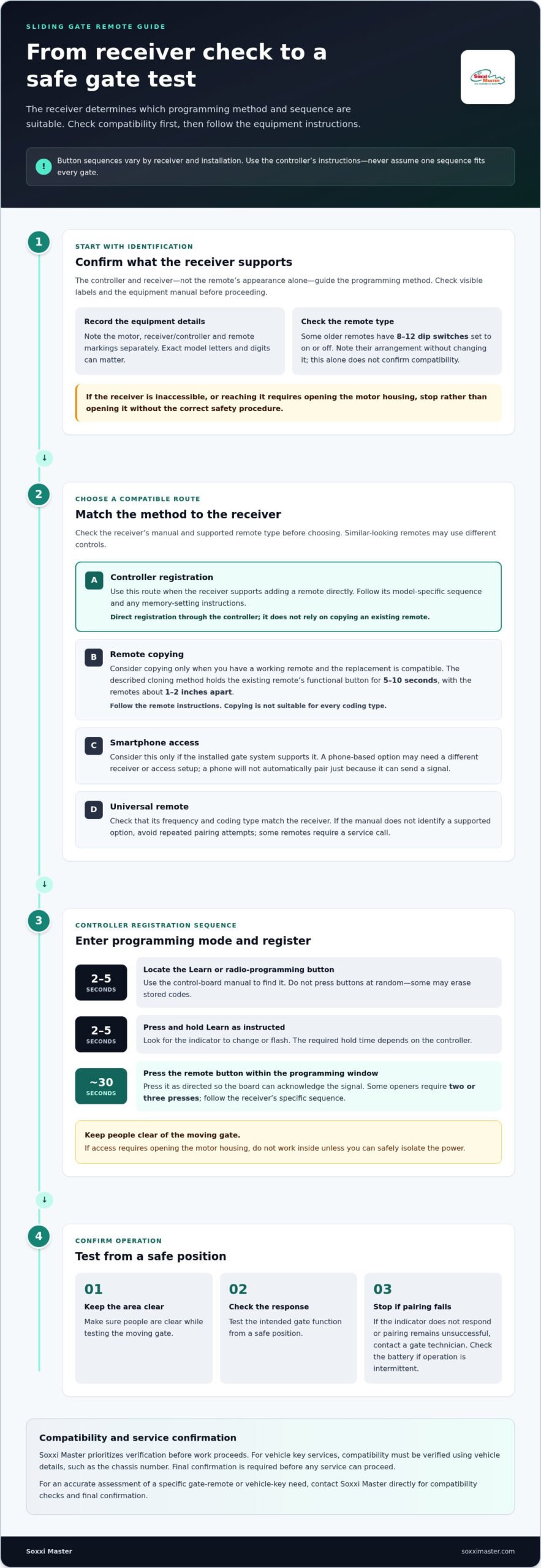
The right method for sliding gate remote control programming depends on the gate’s receiver and the remote’s compatibility. For controller programming, the Learn button is commonly held for 2 to 5 seconds, followed by pressing the remote button within about 30 seconds. Some systems require the remote button to be pressed more than once.
It’s understandable to expect a new remote to work like an existing one, but copying a remote and registering one at the controller are different processes. This guide explains how to enter programming mode, register a compatible remote, and decide whether controller programming, remote copying or smartphone access suits your gate system. You’ll also learn what to identify before starting, so you can follow the appropriate method without assuming every gate uses the same sequence.
Key Takeaways
- Identify the gate motor and remote markings before choosing a programming method; dip-switch remotes have 8 to 12 small switches set to on or off.
- Use controller registration when the gate receiver supports adding a remote directly, and consider copying only when the existing and new remotes are compatible.
- Smartphone access depends on the gate system’s capabilities, so identify the installed setup before deciding whether it’s a suitable option.
- Follow the sequence for the specific receiver and remote, then test that the gate responds as intended before relying on the new control.
Entering programming mode and registering a remote
For sliding gate remote control programming, follow the receiver’s instructions because button sequences vary by model and installation. Keep the gate area clear while testing.
Enter Radio Programming Mode
1. Locate the receiver’s Learn or radio-programming button using the control-board manual. Don’t press buttons at random, since some may erase stored codes. If the receiver is difficult to access, stop rather than opening the motor housing without following the correct safety procedure.
Activate Programming Mode
2. Press and hold Learn for 2 to 5 seconds, as required by the controller. Look for its indicator to change or flash, then continue within about 30 seconds. Keep people clear of the moving gate. If accessing the board requires opening the motor housing, do not work inside unless you can safely isolate the power.
Register the Remote
3. Press the remote button as directed by the controller so the board can acknowledge its signal. Some openers require pressing the button two or three times. Follow the receiver’s model-specific sequence, then test gate operation from a safe position. After programming, Soxxi Master advises checking that the powered gate responds safely when anyone interacts with it.
Common sliding gate brands in Singapore use model-specific sequences, so use the controller’s instructions rather than assuming one procedure fits every brand. Modern gate remotes commonly operate between 300 and 400 MHz; rolling codes are described as the default for gate automation installed in the last 10 to 15 years. If sliding gate remote control programming fails or works intermittently, check the battery and retry the correct sequence. Contact a gate technician if the receiver is inaccessible, its indicator doesn’t respond, or pairing still fails. For a swing gate, assign the intended button only if the controller supports that function.
Choosing between controller programming, remote copying and smartphone access
Choose the method that matches how the receiver accepts a signal. For sliding gate remote control programming, the controller manual and receiver type matter more than the remote’s appearance.
- Use controller programming when the receiver can register a remote directly. Check the manual for its supported remote type and memory settings before starting. Depending on the system, controller programming may register a remote through the controller rather than copying an existing signal. It’s often the clearest route when you can access the receiver and follow its instructions.
- Consider remote copying when you have a working remote and a compatible replacement. For the cloning method described, hold the existing remote’s functional button for 5 to 10 seconds to transfer its code. Position the remotes about 1 to 2 inches apart during cloning. Follow the remote’s instructions, then test the opening function. Copying isn’t suitable for every coding type.
- Assess smartphone access only if the installed gate system supports it. A phone-based option may require a different receiver or access setup from a standard remote. Check the system manual and settings; a smartphone won’t automatically pair just because it can send a signal.
- Check universal remote compatibility against the receiver’s frequency and coding type. A universal remote won’t suit every model. The receiver and remote must support the same method. If the manual doesn’t identify a supported option, avoid repeated pairing attempts. Some remotes require a service call. For sliding gate remote control programming, choose by receiver compatibility, not convenience alone.
A replacement remote needs to match the receiver’s requirements, and auto gate remote duplication is an option for obtaining a compatible copy.
How can I identify my sliding gate motor and remote control model?
Before choosing a replacement or programming method, note the markings on the motor, receiver and remote. Similar-looking equipment can use different controls, so these details help identify what you have.
- Read the motor label. Look for the manufacturer and model number on the motor housing. Note the exact letters and digits, including any suffix. A clear photo can help preserve the information if the label is hard to read.
- Check the receiver or controller label. If it’s visible without opening the housing, record its manufacturer and model separately from the motor. The controller manages remote registration, so its identification can matter more than the gate motor’s name alone.
- Inspect the remote’s markings. Check the back, battery compartment and any printed label for a model number or frequency. Don’t assume two remotes are compatible because they share a case shape or button layout.
- Look for dip switches. Some older remotes have 8 to 12 small switches, each set to an on or off position. Note their arrangement without changing it. A switch pattern can help identify the remote type, but it doesn’t by itself establish compatibility.
- Compare the details with the manual. Match the motor, receiver and remote information to the equipment documentation. If the labels are missing, record the visible features and the gate’s symptoms, such as whether the existing remote still operates it. Avoid guessing a model from appearance alone. These details can help when arranging auto gate remote duplication for a replacement remote.
Soxxi Master: Car & Motorcycle Key Duplication
Soxxi Master provides Auto Gate Remote Duplication for readers whose existing remote needs a compatible replacement. If controller registration or copying hasn’t worked, a specialist assessment can help clarify the next step for your gate setup.
For car or motorcycle key duplication, compatibility must be verified using vehicle details, such as the chassis number. Soxxi Master prioritises this verification, and final confirmation is required before any service can proceed. This helps establish whether the requested key service matches the vehicle.
Share the relevant details about your gate remote or vehicle key when contacting Soxxi Master. Contact Soxxi Master directly for an accurate assessment and final confirmation of your needs.
Choose a verified next step for your gate
Before trying sliding gate remote control programming again, gather the motor and remote identification details and note which method you tried. This information can help determine whether duplication or another approach is suitable for your gate setup.
Soxxi Master offers Auto Gate Remote Duplication for compatible gate systems. It also provides Car & Motorcycle Key Duplication, RFID Access Card Cloning and an All Keys Lost Solution. For vehicle key services, compatibility must be verified using vehicle details such as the chassis number, and final confirmation is required before work proceeds. Soxxi Master prioritises verification before proceeding.
A clear assessment can help you move forward with greater confidence and choose a practical next step for your access needs.
A universal remote works only if it is compatible with your gate system. Check the motor and remote identification details against the receiver’s specifications before choosing a replacement.
Frequently Asked Questions
How do I program a remote control for an automatic sliding gate?
Use the receiver’s instructions to register a compatible remote, then test it from a safe position. First, note the receiver model and check that the remote matches its frequency and coding type. A flashing indicator may show that the controller has entered programming mode, but its meaning varies by model. If the remote doesn’t operate the gate after registration, stop repeating the sequence and recheck compatibility and the manual.
How do I add a new remote or erase all remotes from a sliding gate receiver?
Add a remote through the receiver’s registration procedure. Clearing stored codes is different: holding the programming button for 10 to 15 seconds typically clears remote codes, but the exact action depends on the controller. Treat this as a full reset, since existing remotes may need registering again afterward. Check the model’s instructions before pressing and holding the button, especially if other users rely on stored remotes.
What frequency and coding type does my sliding gate remote use?
Many modern gate remotes operate between 300 and 400 MHz, and rolling codes are described as the default for gate automation installed in the last 10 to 15 years. Check the remote and receiver markings or manuals to identify your system’s frequency and coding type.